Finance Manager

Every dollar, every family, in one place.

Balances, invoices, payment plans, payments and cafeteria accounts, for the whole school office.

See what every family owes, collect it with less chasing, and let payment plans run on their own.

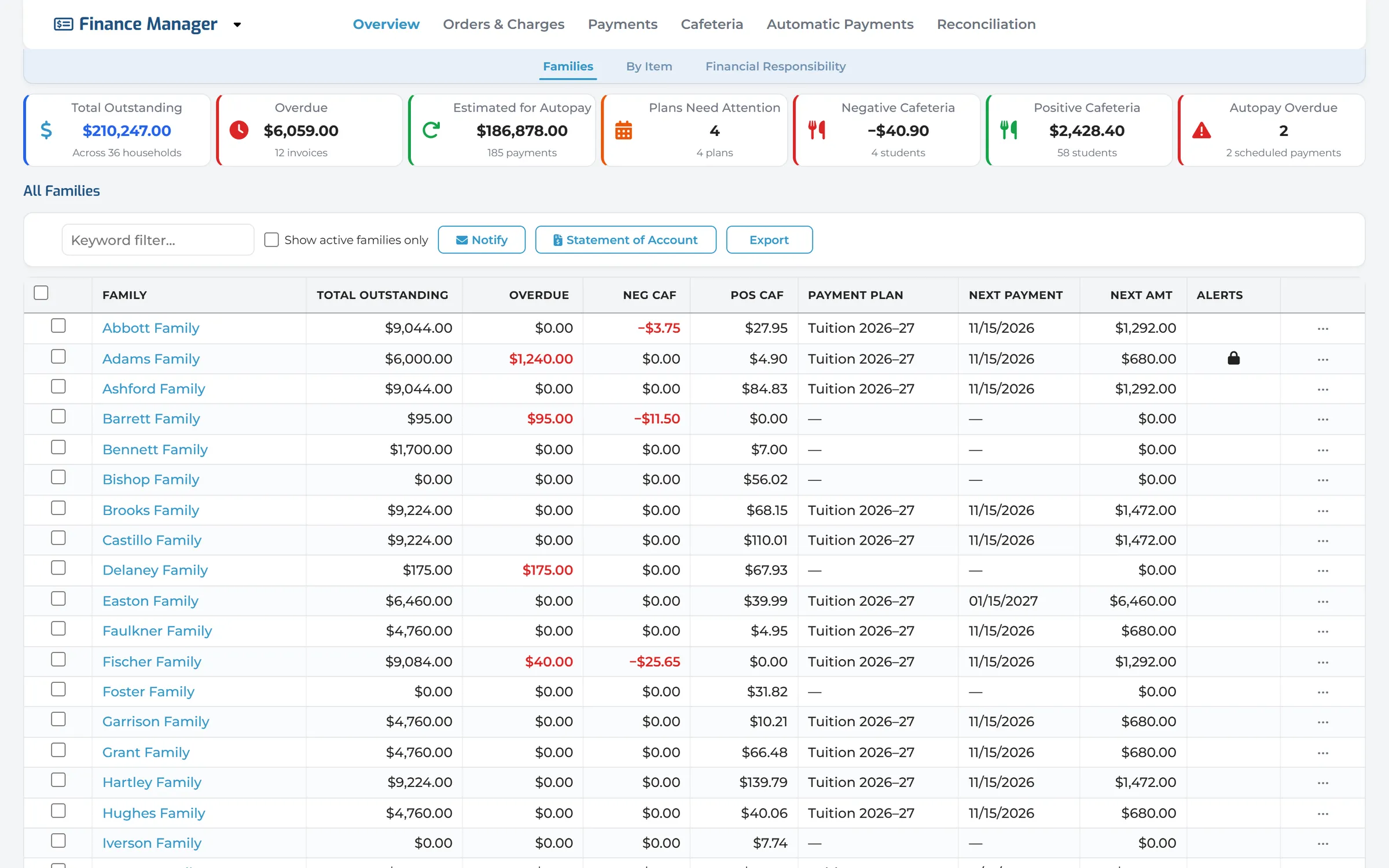
The Families dashboard: totals for outstanding, overdue, autopay, plans that need attention and cafeteria balances, above a list of families with their balances and next payment.
  • See every family’s balance at a glance.

    Totals show what is owed, what is overdue, what autopay will collect, and which payment plans need a look.

  • Send reminders and bill a whole grade.

    Pick a template, choose what to include, and preview each family’s email before it goes. Each family sees only its own charges.

  • Payment plans that collect on their own.

    Tuition splits into scheduled payments from the card or bank account on file. Needs Attention gathers the plans that need a person.

  • Take payments at the desk.

    Pay several invoices at once with a saved card, a bank account or a check, and the receipt is ready the moment it’s done.

Managed Tuition

Let us handle tuition collection for you.

  • Digital Academy manages the collection of tuition payments
  • Payment plans and reminders, set up and running
  • We handle payment processing and family support
  • Regular remittance to your school
  • Less chasing for your business office
Learn About Managed Tuition

Scholarships

Fair, consistent awards, with less paperwork.

  • Compare families’ financial data with IRS records
  • Award amounts calculated automatically
  • Manage applications, awards and allocations
  • Keep the process fair and consistent
  • Help more families afford your school
Learn About Our Scholarship Services

Tools for every financial task.

From billing and reminders to payments and reconciling, Finance Manager gives the school office what it needs, in one place.

View all features
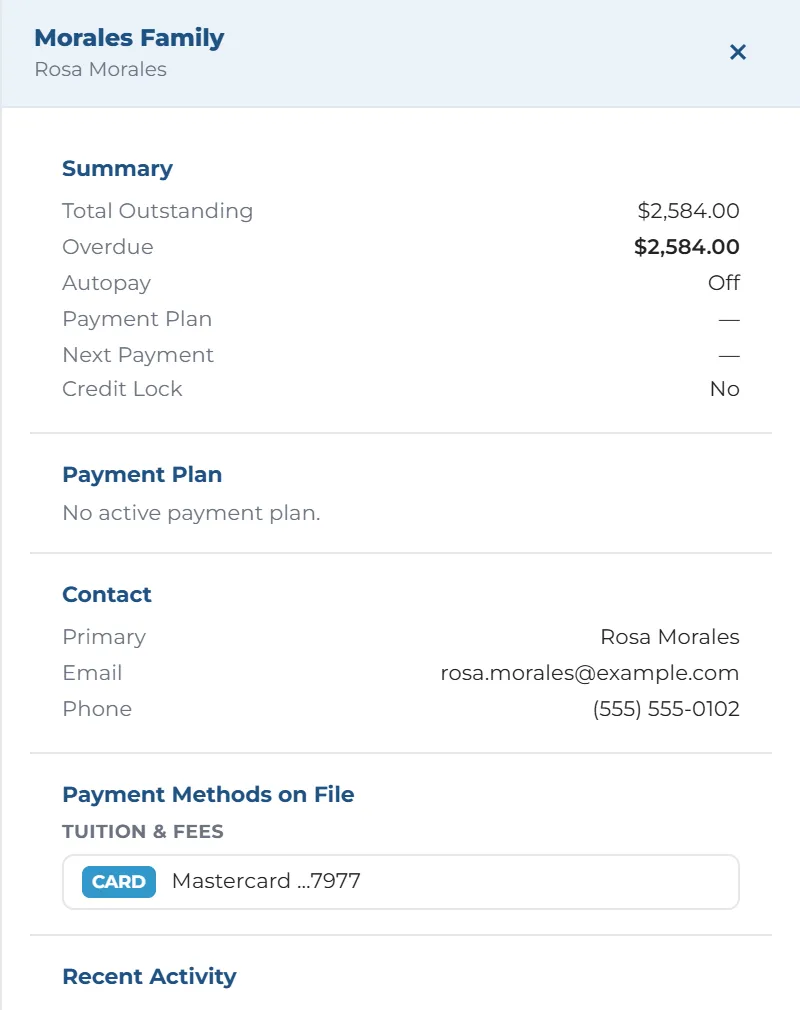
  • One family’s drawer: total outstanding and overdue, autopay, payment plan, contact and the card on file.

    Family Accounts

    Click a family for its balance, payment plan, contacts and cards on file, with reminders and statements one click away.

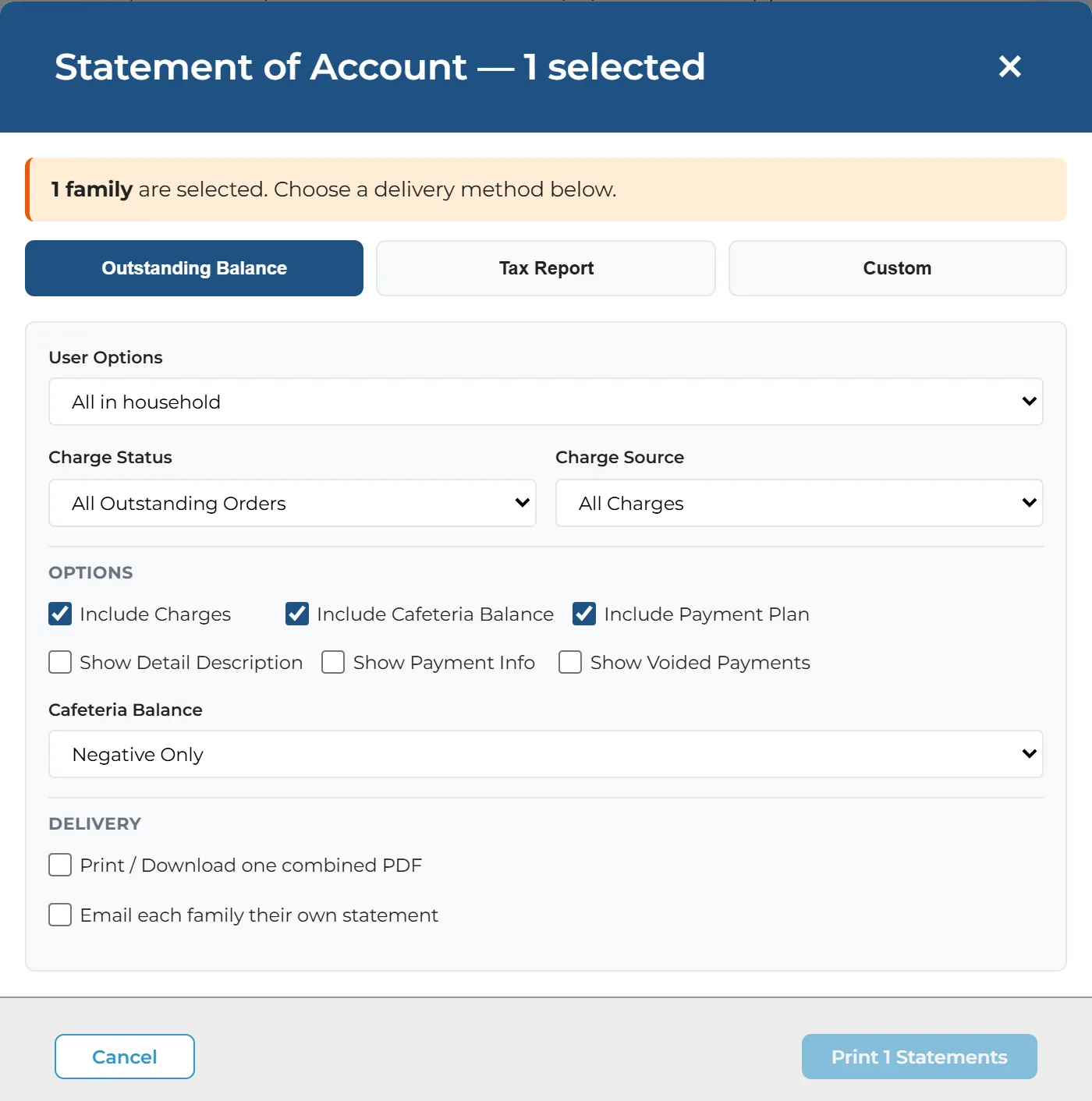
  • The Statement of Account window: what to include, the cafeteria balance, and whether to print one PDF or email each family its own.

    Reminders & Statements

    Email or text families using saved templates, and print or email statements of account as a PDF.

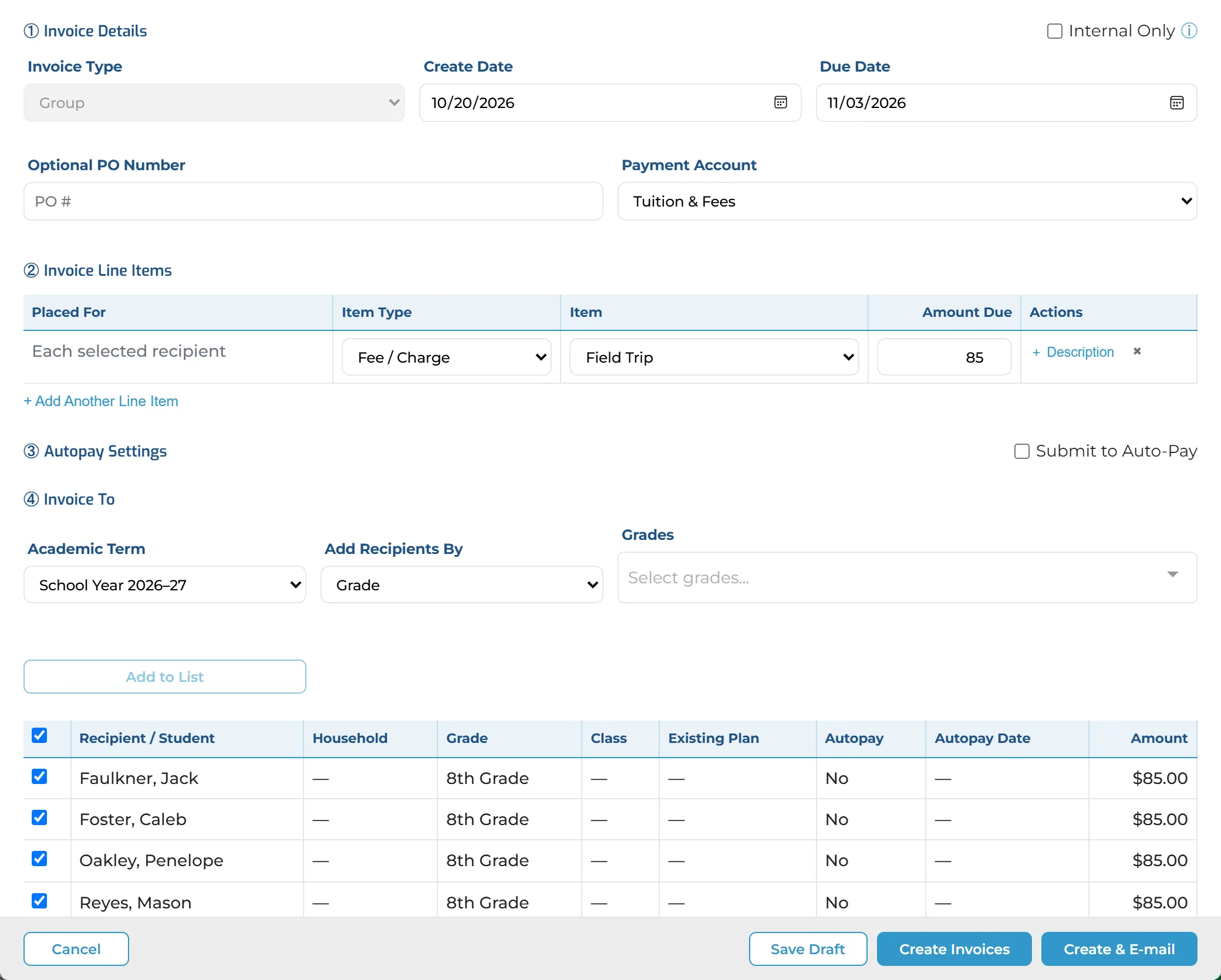
  • A new group invoice: an $85 field trip fee for every 8th-grade student, each listed with the amount.

    Invoices & Charges

    Invoice one family, or a whole grade, class or list of students, and each family gets its own invoice.

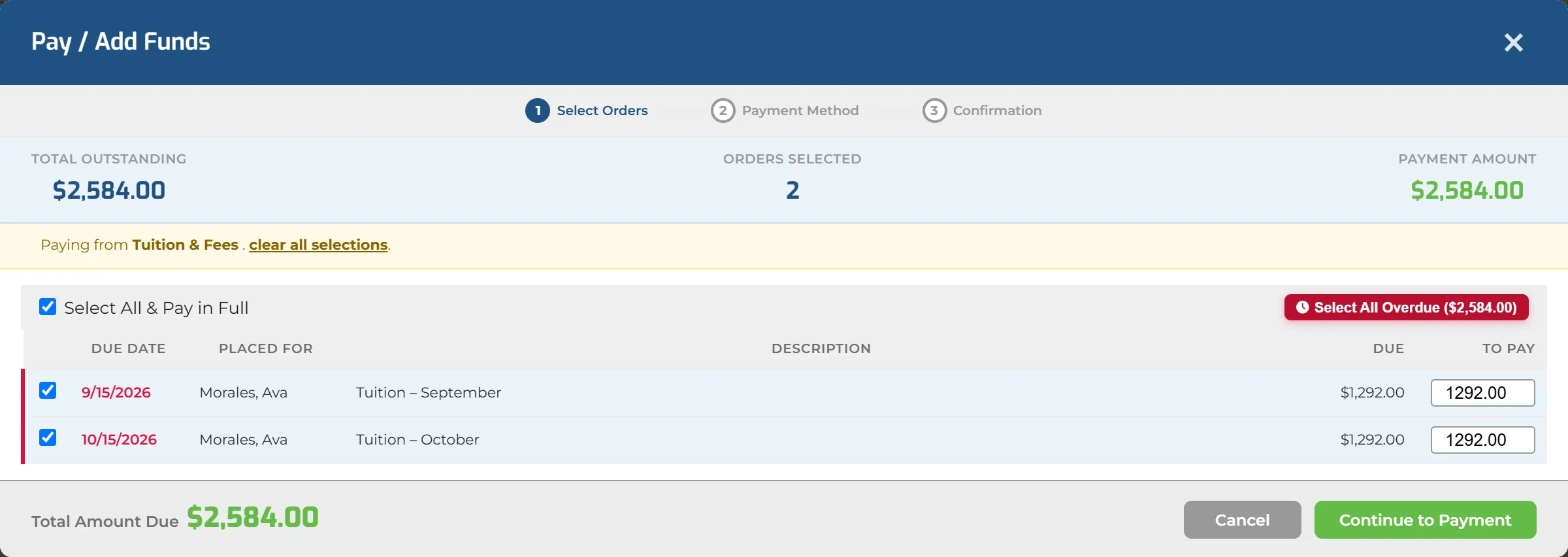
  • The payment window with both overdue tuition months selected and the total to pay.

    Take Payments

    Pay several invoices at once, or select everything overdue in one click, by card, bank account or check.

Key Capabilities

Everything the school office needs to manage tuition and fees with confidence.

View all features
  • Families Dashboard

    Totals for outstanding, overdue, autopay and plans that need attention. Click a total to list just those families.

  • Payment Plans & Autopay

    Scheduled payments from the card or bank account on file, with other fees collected alongside.

  • Reminders & Statements

    Email and text reminders from saved templates, and statements of account printed or emailed as a PDF.

  • Invoices & Charges

    Search every invoice and charge. Refunds, reversals and credits in the same place.

  • Payments at the Desk

    A saved card or bank account, a new one, or a check, with a receipt to print or email straight away.

  • Item Totals & Exports

    What each tuition and fee item has charged, collected and still has due. Export any list to a spreadsheet.

  • Cafeteria Accounts

    Every student’s lunch balance, low and negative balances easy to find, and accounts that top themselves up.

  • Deposits & Reconciliation

    Every deposit batch with its returns and fees. Help Me Reconcile matches the bank statement to your deposits.

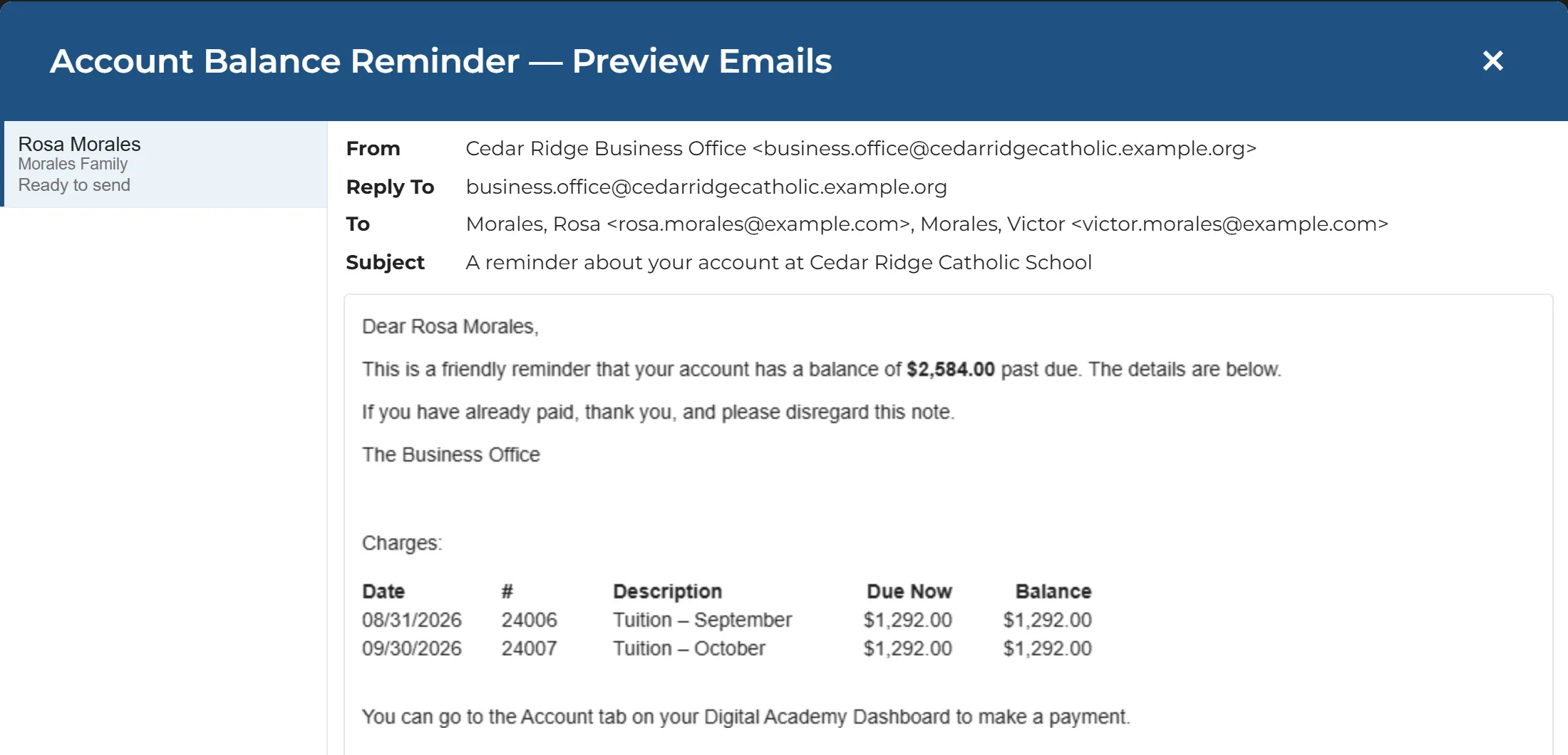
A reminder email previewed for one family, listing its two overdue tuition months.

Reminders

Remind the families who owe.

Pick a saved template, choose what to include, and preview each family’s email before it goes.

  • Overdue invoices, cafeteria balances, and plan payments that are overdue or coming up
  • Fill-in fields, such as the family’s name, completed for each family
  • One email to each responsible parent, listing only their own children’s charges
  • Texts go to confirmed mobile numbers
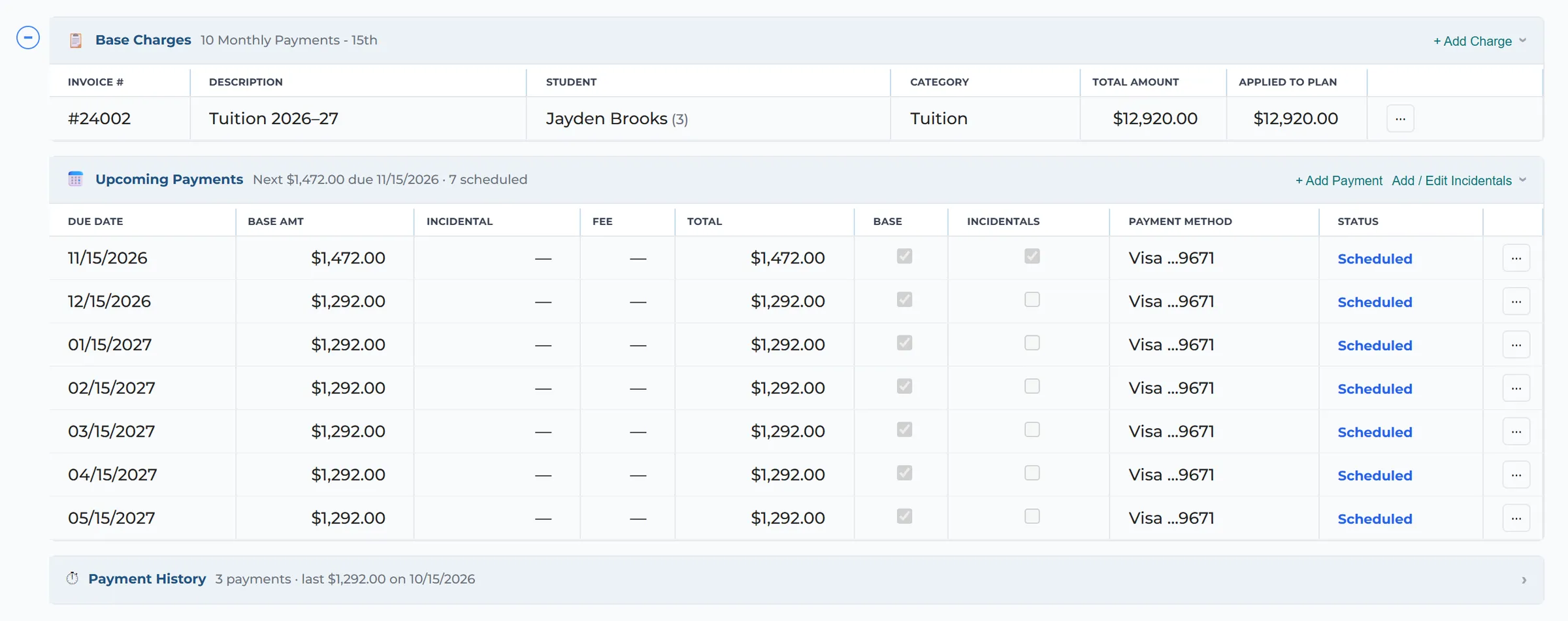
A family’s payment plan: the tuition charge, seven upcoming monthly payments from the card on file, and the payment history.

Automatic payments

Payment plans that collect on their own.

Tuition splits into scheduled payments taken from the card or bank account on file, and other fees can ride along. Every payment, past and upcoming, is in one place.

  • Add charges to a plan, or change who pays it
  • Needs Attention gathers failed payments, expired cards, returned bank payments and plans waiting for review
  • Every scheduled payment in one list
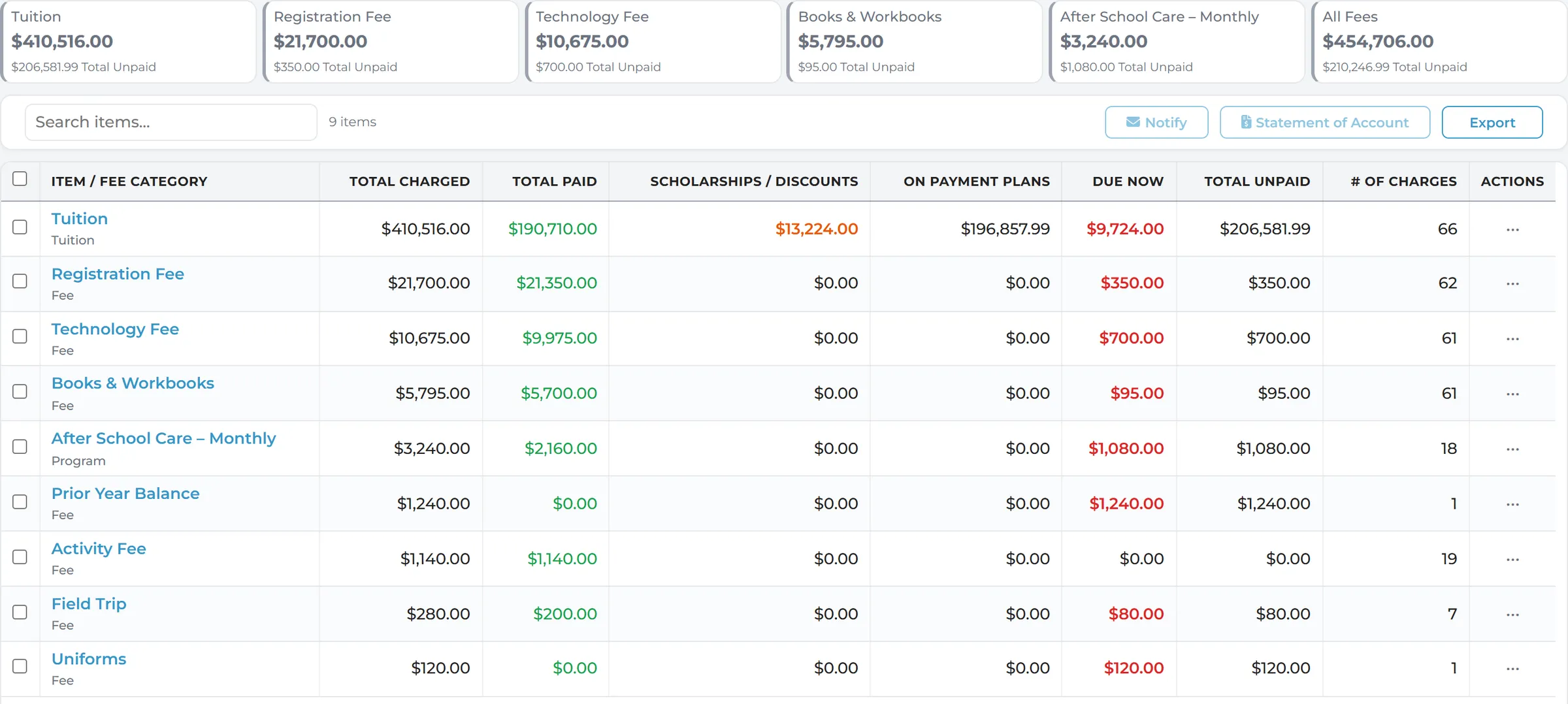
By Item: each tuition and fee item with what it has charged, collected, given in scholarships, has on payment plans and still has due.

By Item

What every item has collected.

Every tuition and fee item: charged, paid, scholarships, still on payment plans, due now and total unpaid.

  • Open an item to see each student’s charge behind it
  • Optional columns for what was paid by cash, check, card and bank account
  • Statements of account for one family or a whole list, ready when asked
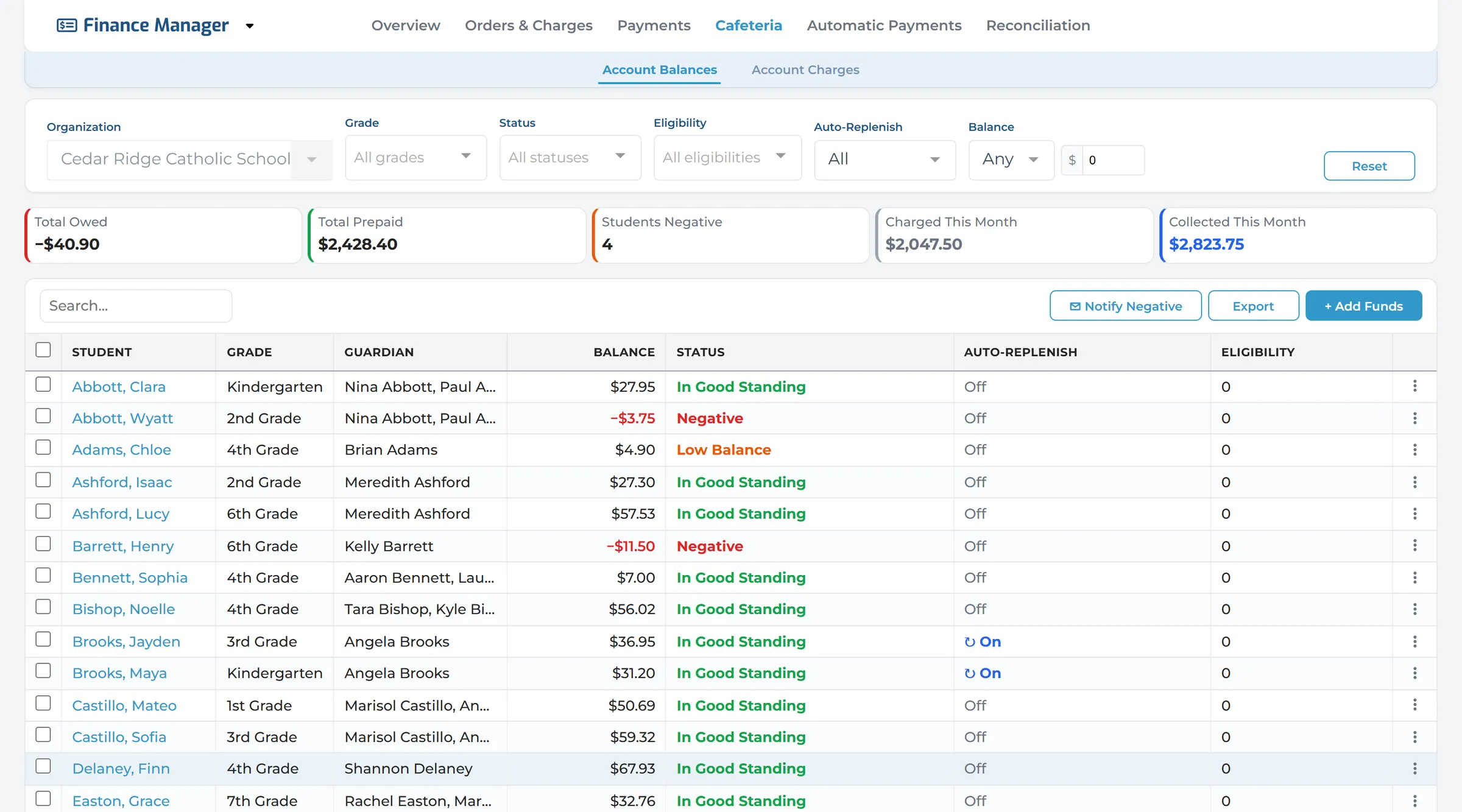
Cafeteria account balances for every student, with negative and low balances marked and the accounts that auto-replenish.

Cafeteria

Lunch balances, without the surprises.

Every student’s lunch balance in one list, with low and negative balances easy to find.

  • See which accounts auto-replenish, with each one’s threshold and top-up amount
  • Add funds, or move them between accounts
  • Every cafeteria charge in one list
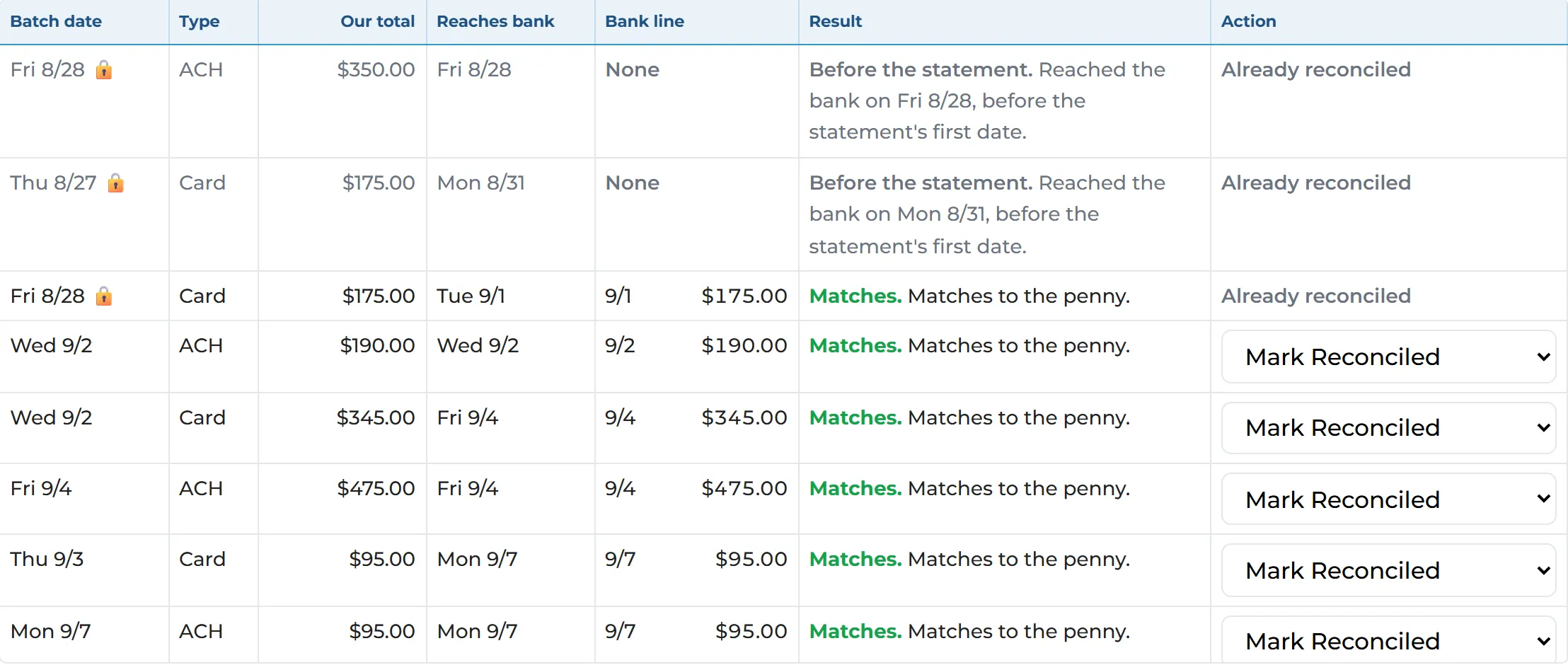
Help Me Reconcile: each deposit batch matched to a line on the bank statement, ready to mark reconciled.

Deposits & Help Me Reconcile

Reconcile deposits with the bank.

Deposits lists every batch your payment processor deposits, with its returns and fees, by the month you reconcile. Help Me Reconcile reads the bank statement and matches each line to its deposit.

  • Upload the statement as a PDF, a picture or a spreadsheet
  • Split deposits and the processor’s fees found for you
  • Nothing changes until a person approves; then lock the month

Built for the whole school office.

Different roles. One view of every family’s balance.

  • Business Managers & Bookkeepers

    • Accurate balances for every family
    • Payment plans that collect on their own
    • A month-end that ties out
  • Principals & Heads of School

    • See how much is overdue
    • Know which families need a conversation
    • Money coming in on time
  • Front-Office Staff

    • Find a family fast
    • Answer “what do I owe?” on the spot
    • Hand over a receipt or a statement
  • Cafeteria Managers

    • Low and negative lunch balances at a glance
    • Accounts that top themselves up
    • Add or move funds in a click

See Finance Manager in Action

See how Digital Academy puts every family’s balance in one place, with the tools to collect it.